Simple, Fast, Private Voice Dictation for Windows

Hold a hotkey, speak, and your words are instantly transcribed. Powered by OpenAI's Whisper model running entirely on your PC. No cloud. No subscriptions. No data leaves your computer.

100% Local Processing — Your Voice Never Leaves Your Device

Everything You Need, Nothing You Don't

A focused tool that does one thing exceptionally well — turning your voice into text.

Push-to-Talk Dictation

Hold Alt + Space to start recording, release to transcribe. Works in any application — Word, email, browsers, code editors.

100% Local & Private

Uses OpenAI's Whisper model running entirely on your PC. No cloud services, no API keys, no subscriptions. Your voice data never leaves your computer.

Fast & Accurate

Transcription typically completes in 1-2 seconds. Automatic punctuation and capitalization powered by the whisper-base-en model optimized for English.

Minimal & Unobtrusive

Lives quietly in your system tray. A small overlay shows recording status. No complex UI or configuration required — just works.

Voice to Text in Seconds

Simple, intuitive workflow that fits into how you already work.

1

Start the App

Runs silently in your system tray

2

Hold the Hotkey

Press and hold Alt + Space

3

Speak

Overlay shows "Listening..."

4

Release

Transcribed locally in 1-2 sec

5

Paste

Ready for Ctrl+V

Clean, Minimal Design

EasyDictate stays out of your way until you need it.
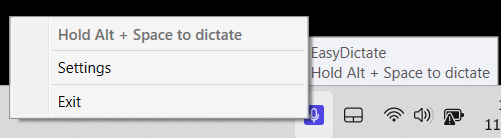
EasyDictate in the system tray

System Tray

Lives quietly in your taskbar. Right-click for quick access to settings.
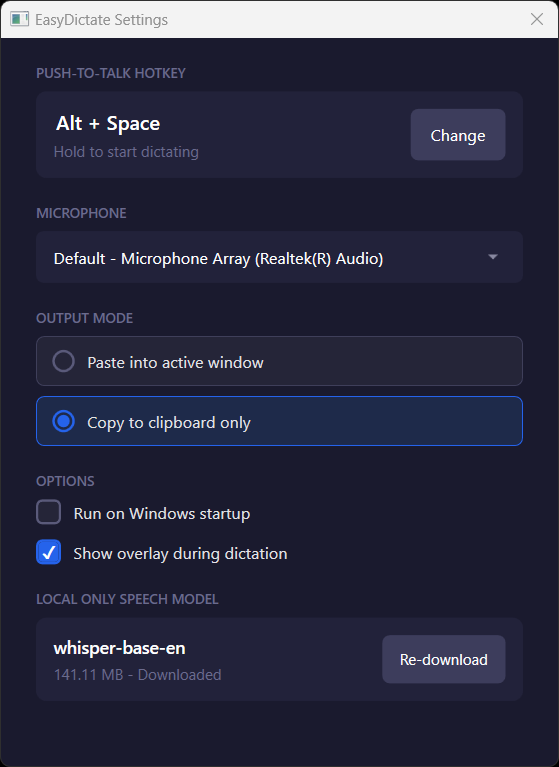
EasyDictate settings window

Simple Settings

Configure your hotkey, microphone, and output preferences. The Whisper model downloads automatically.

Built for People Who Value Privacy

Whether you're protecting sensitive data or just want to type faster.

Privacy-Conscious Users

Traditional voice dictation services send your audio to cloud servers. EasyDictate runs the entire speech recognition pipeline locally. Your conversations, medical notes, legal documents, and personal thoughts stay on your machine.

Power Users & Developers

Voice input is up to 5x faster than typing for many people. Integrate seamlessly into any workflow — dictate code comments, write documentation, compose emails, or take notes without switching contexts.

Completely Free

Most voice dictation apps charge $10-15/month subscriptions. EasyDictate is completely free with no recurring fees — the underlying Whisper technology is open source and runs on your own hardware.

How EasyDictate Stacks Up

See how we compare to other popular dictation solutions.

Feature EasyDictate Wispr Flow Dragon Windows Dictation
Local Processing Full Cloud Full Cloud
Privacy Complete Opt-in Complete Microsoft
Price Free $12/month $150-500 Free
Works Offline Yes No Yes No
Setup Complexity Simple Simple Complex Simple

Start Dictating Today

Completely free. No subscriptions. No cloud fees. Open source.

Free

EasyDictate

Windows Application

Free

No subscriptions. No cloud fees. No catch.

  • 100% local, private processing
  • Works offline, anywhere
  • No account or signup required
  • Whisper model auto-downloads (~140MB)
Download for Windows

System Requirements

OS
Windows 10/11
RAM
4GB min
Disk
~200MB
Audio
Microphone